
Exclusive IP Sale
Desktop crypto trading software that already looks and behaves like a product.
No1 is a buyer-ready desktop trading platform with multi-exchange listings intake, token scoring, per-token strategy assignment, runtime controls, reporting, packaged Linux delivery and acquisition materials already assembled for buyer review.
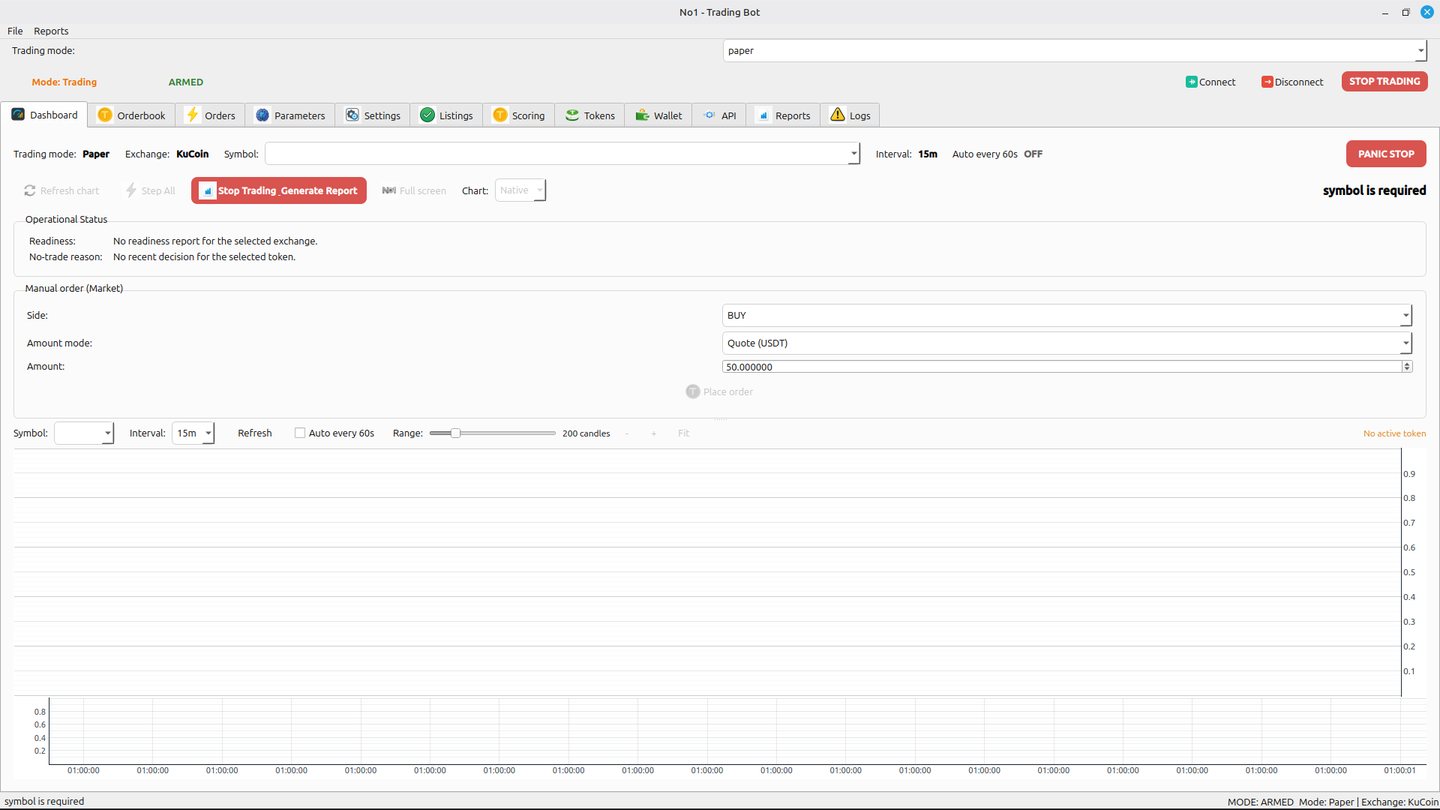
Desktop GUI
Listings Intake
Scoring Workflow
Strategy Routing
Linux Installer
Buyer Docs
Prepared for buyer review
What is already prepared
The buyer is not starting from zero. They acquire a desktop application base with visible workflow, packaged delivery, token intake, scoring, strategy selection, settings, reports and handover materials already in place.
Acquisition structure
No1 is offered as an exclusive IP sale of desktop trading software. The package is structured as software, installer builds, demo assets and handover materials rather than as a managed trading service.
Ideal use case
A founder, small trading team or software shop that wants to skip months of desktop trading product bootstrapping and start from a reviewable software base.
Capabilities
What the product already does
The strongest angle here is not one isolated feature. It is the fact that the desktop workflow already connects discovery, review, activation and monitoring inside one packaged interface.
Listings Intake
Review newly surfaced listings across supported exchanges from one screen and move candidates directly into the next stage of the workflow.
Token Scoring
Score candidates before activation so the workflow is not based on a single blind accept-or-skip decision.
Per-Token Strategy Assignment
Route individual tokens into selected strategy logic instead of relying on one global behavior for every candidate.
Parameters and Guardrails
Review visible thresholds, limits and trading guardrails through the GUI before a token is accepted into the trading set.
Runtime Controls
Desktop surfaces include trading mode, arming state, connect and disconnect actions, panic-style controls and status visibility.
Reports and Review
Generate reports, inspect previews and manually remove stored reports from the GUI, which makes the sale-ready build cleaner for buyer demonstrations.
Wallet and API Surfaces
Wallet and API tabs provide operational surfaces a buyer would expect in a more complete desktop trading product.
Packaged Linux Delivery
The product has a prepared Linux `.deb` installer, a portable build and a structured buyer package rather than a raw repo dump.
Workflow
How the core product flow is presented
Review New Listings
Start from the listings view and review surfaced tokens across supported exchanges.
Move To Scoring
Push a candidate into the scoring queue instead of acting directly from the listing feed.
Run Scoring
Review the candidate with a dedicated scoring step before adding it into the bot flow.
Assign Strategy
Select strategy logic per token and expose the routing visibly through the interface.
Review Parameters
Check thresholds, guardrails and visible configuration before taking the next step.
Accept To Trade
Confirm the token through the acceptance workflow and keep the visible history inside the app.
Demo
Walk through the product as a buyer would first see it
The demo starts with packaged installation, launches the desktop application, moves through the main tabs and then shows the listing-to-scoring-to-strategy flow before returning to the desktop. That gives a buyer a grounded first impression of the software as a product, not just as source code.
- Installer flow from the packaged Linux build
- Main dashboard and runtime surfaces
- Listings intake and scoring queue
- Per-token strategy selection and parameters review
- Token acceptance history, API, wallet and reports tabs
Screens
Screenshots with buyer-facing explanations
These are not just UI snapshots. Together they explain the visible product surface and why the package is more credible than a typical template-style trading script.
Technical Proof
What lowers diligence friction for a buyer
Validation evidence
The buyer package includes validation materials and a prepared review flow instead of forcing a buyer to reverse-engineer project quality from scratch.
Sanitized delivery
The sale-ready package is positioned with paper-safe defaults and without stored exchange credentials in the shipped configuration.
Installer plus portable build
Buyers can review both a packaged `.deb` installer and a Linux portable build, which makes the software look materially closer to a product handover.
Buyer documentation
Setup, handover, demo and supporting materials are already organized to support a smoother buyer review process.
Package
What the buyer receives
This section focuses on the actual transfer package the buyer can review and take over.
Included in the package
- Cleaned source tree prepared for buyer review
- Linux `.deb` installer
- Portable Linux build
- Demo video and screenshot set
- Buyer docs, handover notes and supporting materials
What is not included
- Exchange accounts, balances or private credentials
- Guaranteed returns or performance promises
- Managed trading service claims
- Marketing language that implies audited live profitability
Buyer review materials
- Structured demo video showing installation and workflow
- Screenshot set with buyer-facing explanations
- Prepared installer and portable Linux build
- Documentation and handover materials for diligence